Artificial intelligence can be a remarkably useful tool. But before you start sharing information with an AI assistant, it’s worth understanding a few simple rules that can help protect your privacy and keep you safe.
Imagine asking ChatGPT to help plan a vacation, write an email, or explain a complicated document. These are everyday tasks where AI can save time and make life easier.
But what happens to the information you share? Can you trust everything an AI assistant tells you? And how can you recognize when someone is using AI to mislead you?
The good news is that you don’t need to be a technology expert to use AI responsibly.
In this guide, we’ll explore the most important privacy and safety considerations, explain what to watch out for, and show you practical steps you can take today.
1. Understand What Happens When You Talk to AI
When you type a question into an AI assistant like ChatGPT, Claude, or Google Gemini, your message is sent to the company’s systems for processing.
That means your conversation isn’t necessarily private in the same way as a note you write in a notebook and keep at home.
Depending on the service, account type, and privacy settings, your conversations may be stored, reviewed for safety or quality, or used to help improve AI models.
Different AI companies have different policies, so it’s worth reviewing the privacy information for whichever service you use.
A useful rule: Before sharing something with an AI assistant, ask yourself whether you’d be comfortable storing that information with an online service.
You don’t need to avoid AI altogether. You simply need to be thoughtful about what you share.
2. Know What Information You Should Never Share
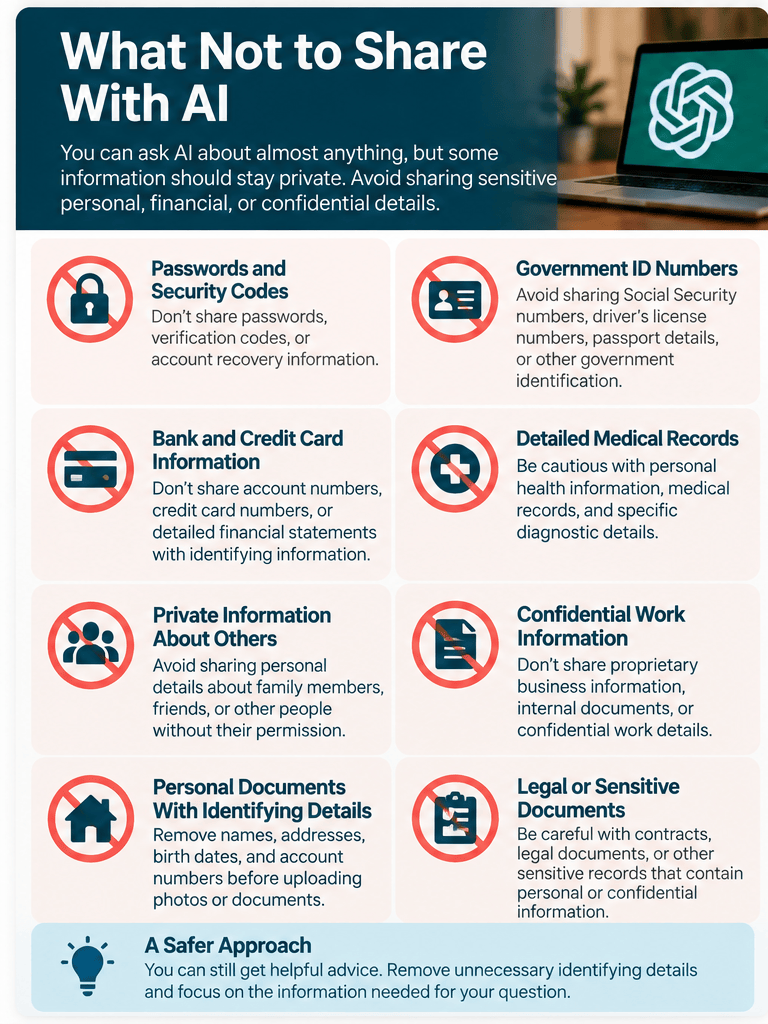
One of the easiest ways to protect your privacy is to avoid entering sensitive personal information into an AI conversation.
Here are some examples of information you should generally keep out of consumer AI assistants:
- Passwords, security codes, and account recovery information
- Social Security numbers or other government identification numbers
- Bank account and credit card numbers
- Detailed medical records containing identifying information
- Private information about family members or other people
- Confidential work documents or proprietary business information
- Personal documents containing addresses, birth dates, or account numbers
This doesn’t mean you can’t ask AI questions about finances, healthcare, or personal matters.
It means you should avoid sharing more identifying information than necessary.
A safer way to ask
Instead of:
“Here is my bank statement with my name, account number, and transactions. Analyze my spending.”
Try:
“Here is a list of my monthly spending by category, without account numbers or personal details. Help me identify areas where I might save money.”
You can often get the same useful advice without exposing sensitive information.
Practical tip: If you want AI to explain a document, consider removing names, account numbers, addresses, and other identifying details before uploading it.
3. Learn How to Manage Your AI Privacy Settings
Many AI services offer controls that let you manage how your information is stored and used.
Let’s look at ChatGPT as an example.
How to review your ChatGPT privacy settings
- Open ChatGPT and sign in.
- Open your account menu and select Settings.
- Select Data controls.
- Look for the setting called Improve the model for everyone.
- If you don’t want your new conversations used to improve OpenAI’s models, turn that setting off.
Turning this setting off does not automatically delete your existing conversations. It controls whether eligible new conversations are used for model improvement.
You can also review your chat history and other privacy options.
What about Temporary Chat?
ChatGPT offers a feature called Temporary Chat.
While a conversation remains temporary, it won’t appear in your regular chat history, create or update memories, or be used to improve OpenAI’s models.
However, temporary does not mean that no information is ever retained. OpenAI may keep a copy for up to 30 days for safety purposes. If you choose to save a temporary conversation, it becomes a regular chat and follows the applicable account settings.
Important: Privacy settings and features change over time. Always consult the current instructions provided by your AI service.
You can find ChatGPT’s official guidance here:
OpenAI: Data controls in ChatGPT
4. Don’t Assume AI Answers Are Always Correct
AI assistants can provide detailed, confident-sounding answers.
Unfortunately, confidence doesn’t guarantee accuracy.
Sometimes AI generates information that sounds convincing but is incorrect or entirely made up. This is often called an AI hallucination.
For example, an AI assistant might:
- Recommend a product with features it doesn’t actually have
- Give an outdated price or business opening time
- Invent a quotation or reference
- Misinterpret a legal or insurance document
- Provide inaccurate medical or financial information
These mistakes aren’t necessarily intentional. They are a limitation of how AI systems generate responses.
How to check an AI answer
Suppose you ask:
“What are the requirements for renewing my passport?”
AI might give you a helpful overview. But passport requirements can change, and individual circumstances matter.
The safer approach is to use the answer as a starting point, then confirm the requirements through the official government website.
Try this prompt:
“Explain the general process for renewing a U.S. passport. Identify which details I should verify on the official government website, and provide the name of the agency responsible.”
Remember: Asking AI to double-check itself can be useful, but it isn’t a substitute for checking an independent, reliable source.
5. Be Especially Careful With Health, Money, and Legal Questions
AI can help you understand unfamiliar terminology and prepare questions for professionals.
For example, you might ask it to explain the difference between a health insurance deductible and coinsurance, or to describe how compound interest works.
These are reasonable educational uses.
But AI should not be your sole source of guidance when a mistake could have serious consequences.
Use extra caution with:
Healthcare: AI can explain general medical concepts, but it may miss important symptoms, misunderstand your circumstances, or provide inappropriate recommendations.
Finances: AI can help explain investment terminology and budgeting concepts, but its suggestions may not reflect your financial situation or current market conditions.
Legal matters: AI can help explain legal terminology, but laws vary by jurisdiction, and generated explanations may be incomplete or incorrect.
A good approach is to use AI to become better informed and prepare thoughtful questions, then consult qualified professionals when necessary.
6. Watch Out for AI-Generated Scams
Unfortunately, the same technology that helps people write, create images, and generate audio can also be misused.
Scammers can use AI to produce convincing emails, realistic-looking photographs, fake videos, and even imitations of people’s voices.
That can make familiar scams harder to recognize.
The fake family emergency
Imagine receiving a phone call from someone who sounds like a family member.
The caller claims to be in trouble and urgently needs money.
Because AI-generated voices can sound realistic, hearing a familiar voice is no longer enough to prove who’s calling.
What should you do?
Hang up and contact the person using a phone number you already know.
You can also establish a family verification phrase for unexpected emergencies.
The convincing email
AI can help scammers create polished emails with professional wording and few spelling mistakes.
An email that looks well written isn’t necessarily legitimate.
Be cautious when a message asks you to:
- Click an unexpected link
- Provide a password or verification code
- Transfer money urgently
- Download an unfamiliar attachment
- Act immediately to avoid a threatened consequence
When in doubt, visit the company’s official website directly rather than following a link in the message.
The key lesson: Urgency, secrecy, and pressure are warning signs, even when a message sounds professional.
7. Learn to Recognize AI-Generated Images and Videos
AI-generated images and videos are becoming increasingly realistic.
You may encounter photographs of events that never happened, videos showing people saying things they never said, or advertisements featuring fabricated testimonials.
Sometimes visual mistakes provide clues, but modern AI-generated media may look completely convincing.
Instead of relying on whether an image looks unusual, consider its source.
Ask yourself:
- Who originally published this image or video?
- Is the source credible?
- Can I find independent reporting that confirms the event?
- Is the content trying to provoke an immediate emotional reaction?
- Does the image appear in a trustworthy context?
You can also use reverse-image search tools to investigate where a picture has appeared online.
Practical tip: Before sharing a surprising image or video, take a moment to verify it. Sharing unverified content can unintentionally spread misinformation.
8. Be Careful When Uploading Photos and Documents
AI assistants can analyze photographs, summarize documents, and explain information contained in uploaded files.
These capabilities are useful, but it’s easy to overlook how much personal information a file might contain.
A photograph could reveal an address, a license plate, or a document sitting in the background.
A PDF might contain names, financial details, signatures, or other confidential information.
Before uploading a file:
- Check whether it contains personal or confidential details.
- Remove or cover information that isn’t necessary for your question.
- Consider whether you have permission to share the information.
- Review the service’s privacy settings and file-handling policies.
For example, if you want AI to help interpret a household electricity bill, you may only need the usage figures and rate information—not your name, account number, or address.
9. Remember That AI Can Sound More Human Than It Is
Modern AI assistants can be remarkably conversational.
They may sound friendly, encouraging, knowledgeable, and even empathetic.
That can make conversations feel natural, which is one reason people enjoy using them.
But an AI assistant isn’t a human friend, doctor, financial adviser, or therapist.
It can generate supportive language and helpful explanations, but it doesn’t possess human judgment or firsthand understanding of your circumstances.
This distinction matters because a convincing conversational style can make people place too much trust in an answer.
A healthy approach: Enjoy the convenience of conversational AI while remembering that you’re interacting with software that can make mistakes.
10. Use a Simple Safety Checklist
You don’t need to memorize every privacy policy or understand the technical details of artificial intelligence.
A few consistent habits will go a long way.
Before sharing information with an AI assistant, ask:
- Is it sensitive? Avoid unnecessary personal or confidential details.
- Do I trust the service? Use established providers and verify website addresses.
- Have I reviewed my settings? Understand the available privacy controls.
- Does the answer need verification? Check important facts against reliable sources.
- Could a mistake cause harm? Use additional caution with medical, financial, legal, and safety-related topics.
- Am I still making the decisions? Treat AI as an assistant rather than an unquestionable authority.
These habits apply whether you’re using ChatGPT, Gemini, Claude, Copilot, or another AI service.
Your Turn: A Five-Minute AI Privacy Checkup
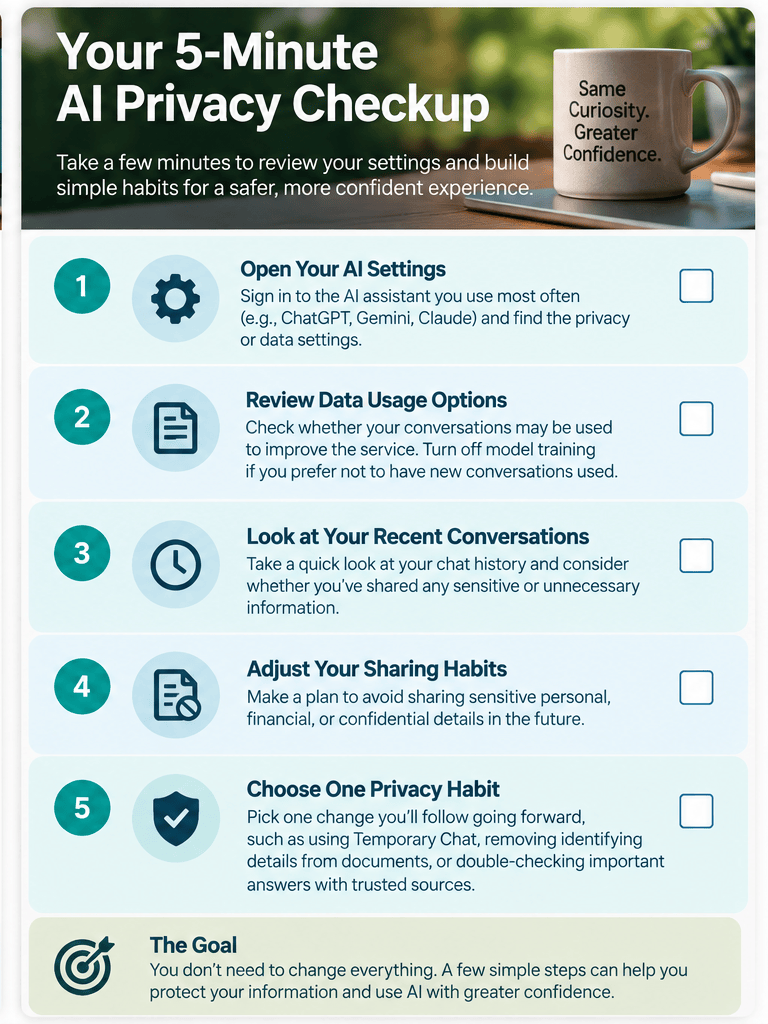
Here’s one practical exercise you can complete today.
Step 1: Open the AI assistant you use most often.
Step 2: Find its privacy or data settings.
Step 3: Review whether your conversations may be used to improve the service.
Step 4: Look at your recent conversations and consider whether you’ve shared anything unnecessarily sensitive.
Step 5: Choose one privacy habit you’ll follow from now on.
You don’t need to change every setting or stop using helpful AI features.
The goal is simply to understand your choices and make informed decisions.
The Bottom Line: Be Curious, but Stay in Control
Artificial intelligence offers exciting opportunities to learn, create, solve problems, and simplify everyday life.
You shouldn’t have to be afraid of it.
At the same time, being curious doesn’t mean abandoning common sense.
Protect your personal information. Verify important answers. Be skeptical of unexpected requests for money or sensitive details. And remember that AI works best when it supports your judgment rather than replacing it.
With a little awareness and a few sensible habits, you can explore AI’s possibilities with greater confidence.
Technology changes. Curiosity doesn’t.
Keep Learning With Promptly Practical
Ready to explore more?
- Your First 15 Minutes With ChatGPT: A Beginner’s Step-by-Step Guide — Learn how to start your first AI conversation.
- What Is ChatGPT? A Simple Explanation for Beginners — Understand how AI assistants work.
- 10 Surprisingly Useful Ways AI Can Make Everyday Life Easier — Discover practical ways to put AI to work.
The more you understand these tools, the more confidently you can use them.

