Curious about ChatGPT but not sure where to begin? In just 15 minutes, you can learn how to use AI, ask better questions, and discover a few surprisingly useful things it can do.
Artificial intelligence, or AI, seems to be everywhere these days. You hear about it in the news, see it appearing in familiar apps, and perhaps know someone who uses ChatGPT regularly.
But what exactly do you do with it?
The good news is that getting started is easier than you might think. You don’t need to understand computer programming, learn complicated commands, or have any special technical knowledge.
If you can type a question into a search engine or send a text message, you already have the basic skills needed to use ChatGPT.
In this tutorial, we’ll walk through your first conversation with AI, one simple step at a time.
What you’ll need:
- A computer, tablet, or smartphone
- An internet connection
- About 15 minutes
- A little curiosity
You can begin with ChatGPT’s free features. There’s no need to purchase a subscription for this tutorial.
Minutes 1–3: Meet ChatGPT
ChatGPT is an AI assistant developed by OpenAI. You can communicate with it using everyday language, much like having a conversation with another person.
You can ask questions, request explanations, brainstorm ideas, draft messages, and get help organizing information.
Unlike a traditional search engine, which typically provides a list of websites, ChatGPT can generate a direct response and continue the conversation as you ask follow-up questions.
That makes it especially useful when you’re learning something new or working through an idea.
Let’s get started
- Open your internet browser, such as Safari, Chrome, Edge, or Firefox.
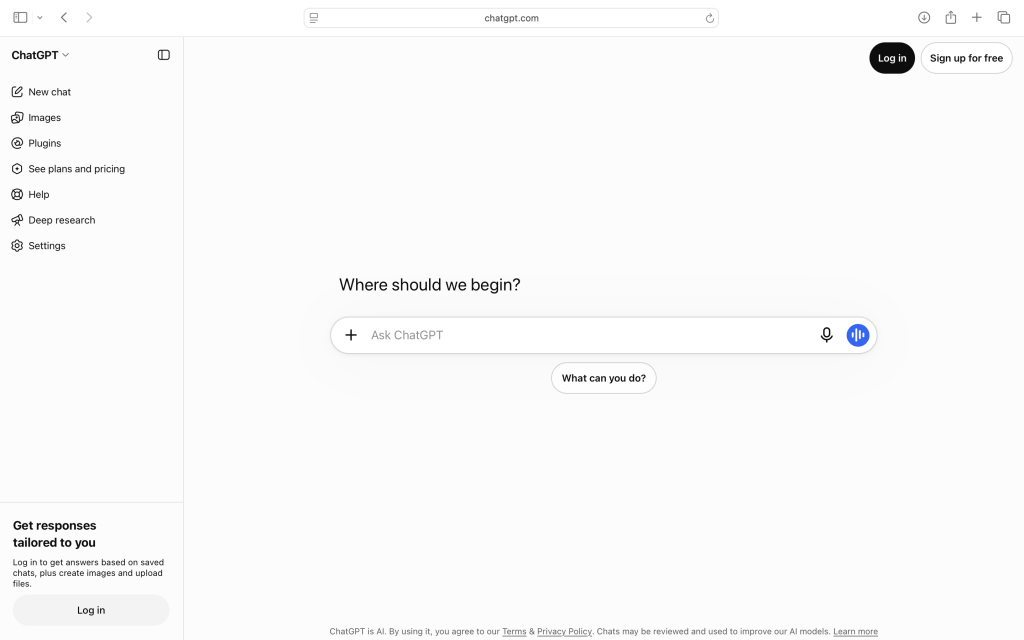
- Visit https://chatgpt.com.
- Follow the instructions on the screen to begin using ChatGPT. You may be able to try it without creating an account, depending on availability.
- Look for the area where you can type a message.
That’s where your conversation begins.
A helpful tip: ChatGPT’s appearance and features can change over time. Don’t worry if your screen looks slightly different from the examples in this guide. The basic process remains the same: type a message and send it.
Minutes 4–6: Ask Your First Question
Let’s start with something simple.
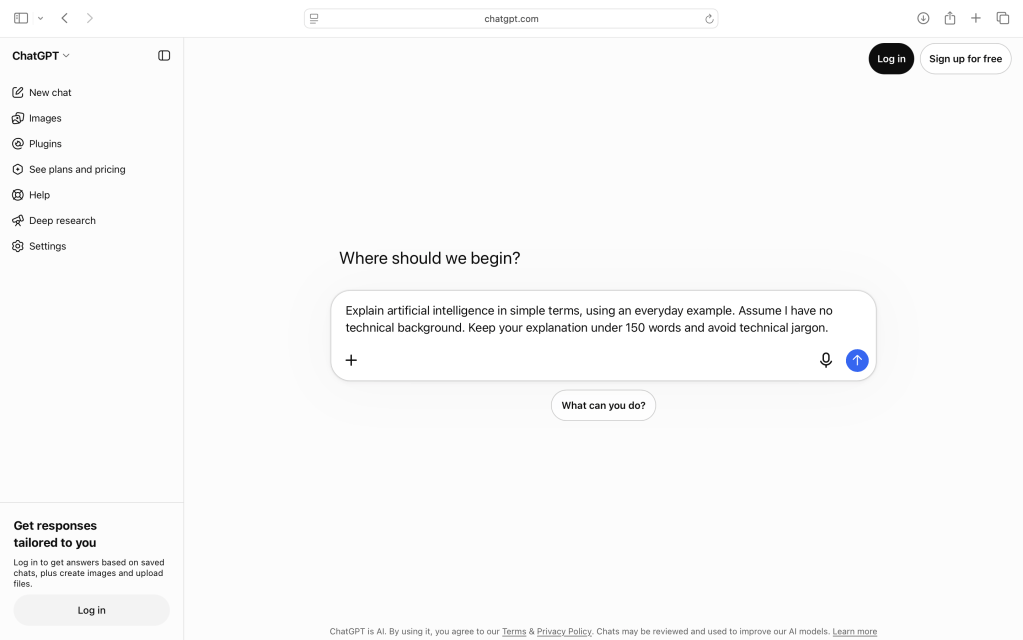
Click in the message box, type the following question, and press Enter or select the send button.
Try this prompt:
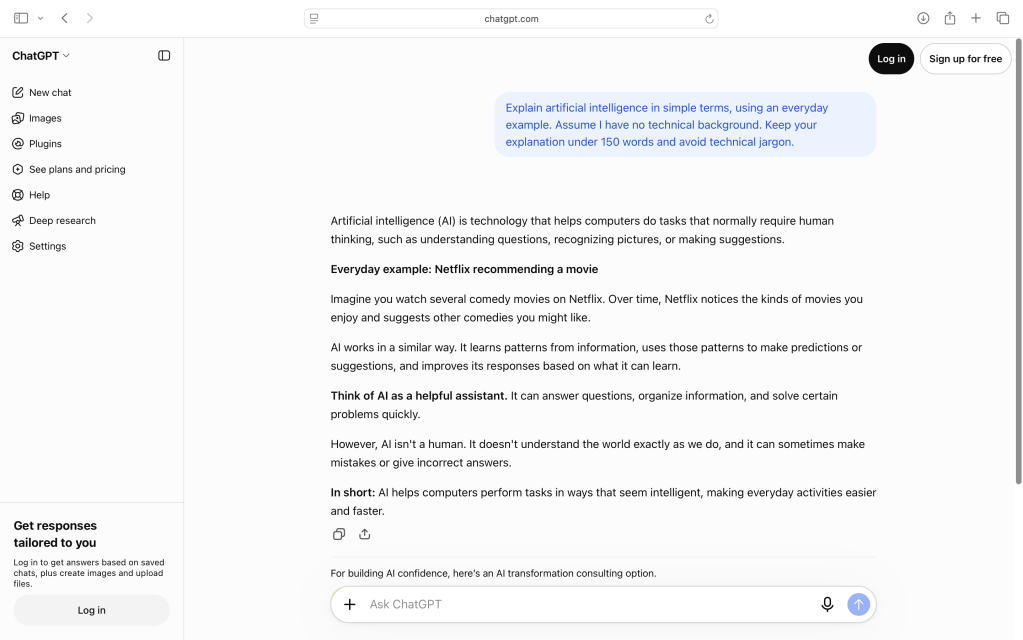
Explain artificial intelligence in simple terms, using an everyday example.
ChatGPT should respond with an explanation of AI, often including examples of how it works.
Take a moment to read the response.
Notice that you didn’t have to use any special commands or technical language. You simply asked a question.
That’s the first important lesson:
You communicate with ChatGPT using ordinary language.
Try another question
Now ask about something that genuinely interests you.
For example:
What are three interesting things I could learn about astronomy as a beginner?
Or:
Suggest five easy dinner ideas using chicken, tomatoes, and spinach.
Or:
Explain how a digital camera captures an image, without using technical jargon.
The possibilities are broad because ChatGPT can help with many different subjects.
Minutes 7–10: Discover the Power of Follow-Up Questions
This is where ChatGPT becomes especially interesting.
You don’t have to start over every time you want more information. You can continue the conversation, just as you would when speaking with someone.
Let’s say you asked ChatGPT for dinner ideas, and it suggested a chicken pasta recipe.
You could follow up with:
Can you make that recipe healthier?
Then:
Can you adjust it to serve two people?
And finally:
Create a shopping list for the ingredients.
ChatGPT can use the earlier messages in the conversation to understand what you’re referring to.
Learn to give better instructions
A request you type into ChatGPT is often called a prompt.
A prompt doesn’t need to be complicated. But the more useful context you provide, the more relevant the response can become.
Compare these two examples.
Basic prompt:
Suggest a vacation.
More helpful prompt:
Suggest three destinations for a seven-day vacation in May. We enjoy beautiful scenery, interesting restaurants, and outdoor activities. We’d prefer somewhere that isn’t extremely crowded.
The second prompt gives ChatGPT more information about what you’re trying to accomplish.
That makes it easier for the AI to tailor its suggestions.
A simple formula for better prompts
When you’re not getting the results you want, try including three things:
- Your goal: What are you trying to accomplish?
- Your situation: What background information would help?
- Your preferences: How would you like the answer presented?
For example:
I want to start growing herbs at home. I have a small patio that receives about four hours of sunlight each day. Recommend five beginner-friendly herbs and explain how to care for them in a simple table.
You don’t need to use all three elements every time. They’re simply a useful way to improve your questions.
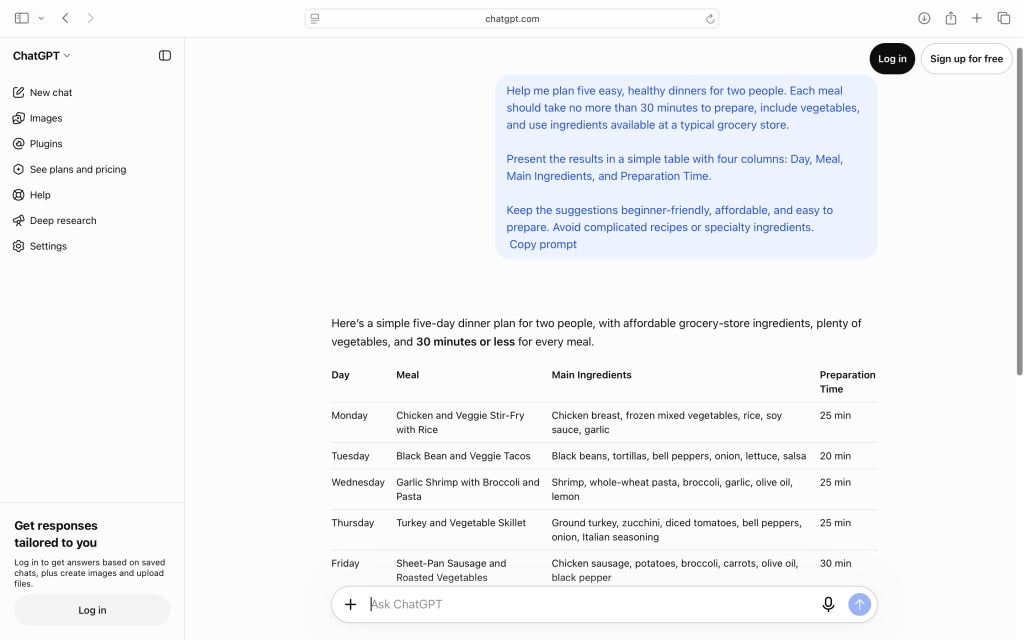
Below is an example around meal planning, where ChatGPT provides meal ideas in a table format for each day of the week. You could expand the prompt below to ask for detailed recipes for each suggestion, and ChatGPT would provide detailed recipes for each day.
Minutes 11–13: Put ChatGPT to Work
Now let’s try something genuinely useful.
Choose one of these three activities based on your interests.
Project A: Plan a week’s worth of dinners
Copy this prompt into ChatGPT:
Help me plan five easy dinners for two people. Each meal should take no more than 30 minutes to prepare. Include vegetables, use common grocery-store ingredients, and avoid overly complicated recipes. Present the results in a table with the meal name, ingredients, and approximate preparation time.
You can refine the results by asking for different ingredients, a shopping list, or recipes that accommodate dietary preferences.
Project B: Learn something new
Try this prompt:
I’d like to learn the basics of birdwatching. Create a simple seven-day beginner learning plan. Each day should include one topic to learn and one short activity I can do outdoors.
This approach works for almost any hobby or interest, from photography and gardening to music and history.
Project C: Organize a personal project
Try this prompt:
I want to organize and back up several years of digital photographs. Create a beginner-friendly plan that explains how to organize folders, identify duplicate pictures, and maintain a reliable backup. Keep the instructions simple and explain any technical terms.
ChatGPT can help turn a large, overwhelming project into manageable steps.
What did you notice?
In each example, you’re using AI for a practical purpose.
You’re not learning technology simply for the sake of learning technology. You’re using it to accomplish something meaningful.
That’s the philosophy behind Promptly Practical.
Minutes 14–15: Two Important Things Every Beginner Should Know
Before you finish your first ChatGPT session, there are two habits worth developing.
1. ChatGPT can make mistakes
Although ChatGPT can produce convincing explanations, it doesn’t always provide accurate information.
It can misunderstand questions, overlook important details, or confidently present information that is incorrect.
This is particularly important when dealing with medical, financial, legal, or other consequential decisions.
A good rule: Use ChatGPT to help you understand a subject, organize your thinking, or identify questions worth investigating. Verify important facts using reliable sources before acting on them.
For example, if ChatGPT suggests a destination for an upcoming trip, confirm current prices, schedules, and availability through the relevant travel providers.
2. Be thoughtful about personal information
Avoid entering passwords, Social Security numbers, bank account information, confidential work documents, or other sensitive details into a conversation.
You can often get useful assistance without sharing identifying information.
Instead of providing your full financial records, for example, you could ask:
Explain the basic differences between a traditional IRA and a Roth IRA for someone planning to retire within five years.
You can also review ChatGPT’s privacy and data controls in its settings.
Remember: AI is a tool to support your judgment, not replace it.
Congratulations! You’ve Had Your First AI Conversation
In just 15 minutes, you’ve learned how to:
- Access ChatGPT and begin a conversation
- Ask questions using everyday language
- Improve answers with follow-up questions
- Write more useful prompts
- Apply AI to real-life tasks
- Recognize important accuracy and privacy considerations
That’s a meaningful first step.
You don’t have to become an AI expert to benefit from these tools. You simply need to get comfortable experimenting with them.
What Should You Try Next?
Over the next few days, try using ChatGPT for one small task each day.
Perhaps ask it to explain an unfamiliar term, help plan a meal, suggest a photography project, or organize a weekend activity.
As you experiment, pay attention to which uses actually save you time, help you learn, or make something more enjoyable.
And remember that you can always ask ChatGPT to explain something differently.
One of the most useful follow-up prompts is also one of the simplest:
Can you explain that in a simpler way and give me an example?
Technology changes. Curiosity doesn’t.
At Promptly Practical, we’ll help you keep exploring, one useful skill at a time.

