Have you ever asked ChatGPT a question and received an answer that was technically correct but not particularly helpful?
Maybe you asked for dinner ideas and got recipes that required ingredients you didn’t have. Or you requested travel suggestions and received a list of tourist attractions that didn’t interest you.
The problem might not be the AI assistant. It might simply need a little more information.
One of the most useful skills you can learn when working with artificial intelligence is how to ask better questions.
The good news? You don’t need special terminology, technical knowledge, or complicated instructions.
You just need to learn how to give AI enough context to understand what you’re trying to accomplish.
Let’s explore how.
What Is an AI Prompt?
A prompt is simply the question, request, or instruction you give an AI assistant.
If you type “What’s a good recipe for chicken?” into ChatGPT, that’s a prompt.
If you ask Google Gemini to help plan a weekend getaway, that’s a prompt too.
Prompts can be short or detailed, simple or complex.
There’s no requirement to use special commands or computer programming language.
In fact, some of the most effective prompts sound like ordinary conversations.
The important thing is to communicate what you want clearly.
Why Some Prompts Work Better Than Others
Imagine asking a friend:
“Where should I go on vacation?”
Your friend might suggest Hawaii, Paris, or a national park.
But what if you dislike flying, prefer quiet destinations, and only have three days available?
Without that information, even a knowledgeable friend would struggle to make a useful recommendation.
AI assistants face a similar challenge.
They can generate answers based on the information you provide, but they don’t automatically know your preferences, circumstances, or goals.
The more relevant context you provide, the better chance you have of receiving an answer that actually fits your needs.
That doesn’t mean every prompt needs to be long.
It means including the details that matter.
A Simple Formula for Better AI Prompts
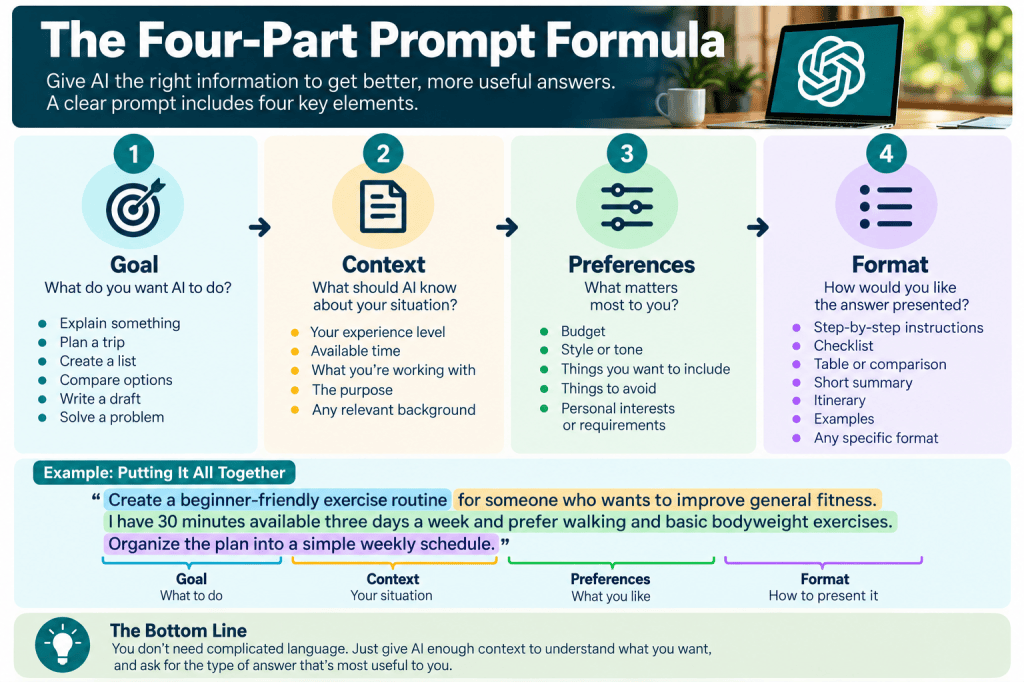
Here’s a straightforward approach that works for many everyday situations.
Goal + Context + Preferences + Format
1. Goal: What do you want AI to do?
Start by explaining the task.
Examples: Plan a meal, explain a concept, organize a project, or draft an email.
2. Context: What should AI know about your situation?
Include background information that would influence the answer.
Examples: Your experience level, available equipment, time constraints, or the purpose of the task.
3. Preferences: What matters most to you?
Mention any requirements or limitations.
Examples: Your budget, dietary preferences, desired tone, or things you want to avoid.
4. Format: How would you like the answer presented?
Ask for a checklist, comparison table, short explanation, itinerary, or step-by-step instructions.
Putting It All Together
Instead of:
“Help me exercise.”
Try:
“Create a beginner-friendly exercise routine for someone who wants to improve general fitness. I have 30 minutes available three days a week and prefer walking and basic bodyweight exercises. Organize the plan into a simple weekly schedule.”
Notice that the second prompt doesn’t use any complicated language.
It simply explains what you want and what matters to you.
For exercise advice involving medical conditions, injuries, or significant limitations, consult an appropriate healthcare professional.
Six Everyday Examples: Basic Prompts vs. Better Prompts
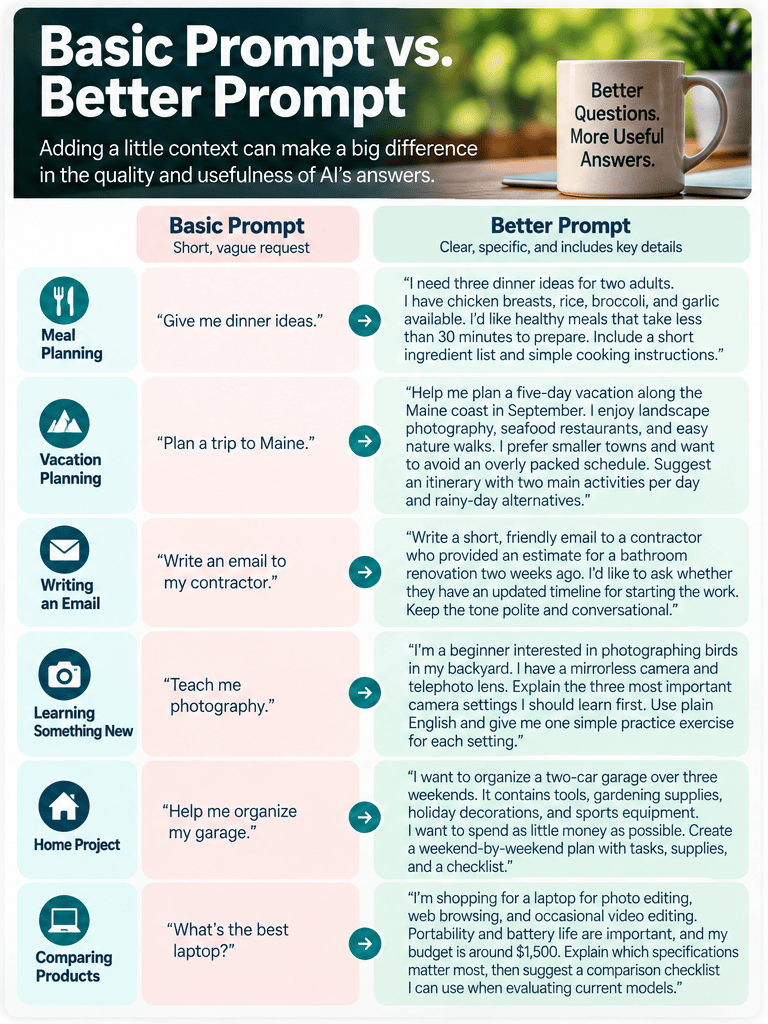
Let’s see how this approach works in real situations.
Example 1: Meal Planning
Basic prompt:
“Give me dinner ideas.”
AI might respond with a general list of popular meals.
Better prompt:
“I need three dinner ideas for two adults. I have chicken breasts, rice, broccoli, and garlic available. I’d like healthy meals that take less than 30 minutes to prepare. Include a short ingredient list and simple cooking instructions.”
Why it’s better:
The AI now understands your ingredients, serving size, time limit, and preferred format.
You’re much more likely to receive ideas you can actually use.
Try taking it further:
“Which of these meals would create the fewest dirty dishes?”
Example 2: Planning a Vacation
Basic prompt:
“Plan a trip to Maine.”
This could produce an itinerary covering destinations you don’t want to visit or activities that don’t interest you.
Better prompt:
“Help me plan a five-day vacation along the Maine coast in September. I enjoy landscape photography, seafood restaurants, scenic drives, and easy nature walks. I prefer smaller towns and want to avoid an overly packed schedule. Suggest an itinerary with two main activities per day and rainy-day alternatives.”
Why it’s better:
You’ve explained your interests, preferred pace, destination, season, and desired structure.
Try taking it further:
“Which two towns would make the best bases for this itinerary, and what are the trade-offs between them?”
Remember to verify opening hours, travel times, and availability before making reservations.
Example 3: Writing an Email
Basic prompt:
“Write an email to my contractor.”
Without context, AI has to guess what you’re trying to communicate.
Better prompt:
“Write a short, friendly email to a contractor who provided an estimate for a bathroom renovation two weeks ago. I’d like to ask whether they have an updated timeline for starting the work. Keep the tone polite and conversational, without sounding impatient.”
Why it’s better:
The AI understands the situation, your purpose, and the tone you want.
Try taking it further:
“Make the message a little shorter and less formal.”
Example 4: Learning Something New
Basic prompt:
“Teach me photography.”
Photography is a huge subject. An AI assistant might provide far more information than you need.
Better prompt:
“I’m a beginner interested in photographing birds in my backyard. I have a mirrorless camera and a telephoto lens. Explain the three most important camera settings I should learn first. Use plain English and give me one simple practice exercise for each setting.”
Why it’s better:
You’ve identified your experience level, equipment, subject, and preferred learning style.
Try taking it further:
“Explain shutter speed using a real-world example of photographing a bird in flight.”
Example 5: Organizing a Home Project
Basic prompt:
“Help me organize my garage.”
This might produce a generic list of organizational tips.
Better prompt:
“I want to organize a two-car garage over three weekends. It contains tools, gardening supplies, holiday decorations, and sports equipment. I want to spend as little money as possible. Create a weekend-by-weekend plan with tasks, supplies, and a checklist.”
Why it’s better:
The AI knows the size of the project, available time, budget preference, and expected output.
Try taking it further:
“Create a simple system for deciding what to keep, donate, recycle, or throw away.”
Example 6: Comparing Products
Basic prompt:
“What’s the best laptop?”
There isn’t one laptop that’s best for everyone.
Better prompt:
“I’m shopping for a laptop primarily for photo editing, web browsing, and occasional video editing. Portability and battery life are important, and my budget is around $1,500. Explain which specifications matter most, then suggest a comparison checklist I can use when evaluating current models.”
Why it’s better:
The AI can focus on your intended uses, priorities, and budget instead of making a generic recommendation.
Try taking it further:
“Explain the difference between 16GB and 32GB of memory for my workload without using technical jargon.”
For purchasing decisions, confirm current specifications and prices with manufacturers and retailers.
The Most Overlooked Prompting Skill: Ask Follow-Up Questions
Here’s something many beginners don’t realize:
Your first prompt doesn’t have to be perfect.
In fact, one of the biggest advantages of conversational AI is that you can refine the answer through follow-up questions.
Imagine asking for a vacation itinerary.
The AI provides a five-day schedule, but you notice it includes too much driving.
You could respond:
“That’s a good start, but I’d prefer to drive no more than two hours per day. Can you revise the itinerary?”
Or perhaps the suggested hotels are too expensive.
You could say:
“Keep the same destinations, but suggest more affordable lodging options.”
You don’t need to start a new conversation every time.
Within the same conversation, the AI can generally use the context you’ve already provided.
Think of it as working through a problem with an assistant rather than placing an order from a vending machine.
Five Useful Follow-Up Questions
These simple phrases can improve almost any AI conversation:
- “Can you explain that in simpler language?”
- “Can you give me a real-world example?”
- “What important details might I be overlooking?”
- “Can you compare the advantages and disadvantages?”
- “Can you organize that into a step-by-step checklist?”
You can copy these questions and use them whenever an AI response needs improvement.
Should You Tell AI to Act Like an Expert?
You may have seen people recommend starting prompts with phrases such as:
“Act as a professional chef.”
“Act as a travel agent.”
“Act as an experienced teacher.”
These instructions can sometimes help guide the style or perspective of an answer.
For example:
“Explain this photography concept as an experienced instructor teaching a beginner.”
That may encourage the AI to provide a more approachable explanation.
But there’s an important distinction.
Telling AI to act like an expert doesn’t make its information more reliable.
An AI assistant can still make mistakes, even when you ask it to respond as a doctor, attorney, or financial adviser.
Use these instructions to guide how information is explained, not as a guarantee of accuracy.
Three Common Prompting Mistakes
Mistake 1: Being Too Vague
“Help me save money.”
That’s a reasonable starting point, but it doesn’t provide much direction.
A more useful prompt might explain whether you’re trying to reduce grocery expenses, lower household bills, or create a monthly budget.
Mistake 2: Providing Too Much Unnecessary Information
More detail isn’t always better.
A prompt containing several paragraphs of unrelated background can make the actual request harder to identify.
Focus on information that directly affects the answer.
And remember: Never include passwords, account numbers, or unnecessary sensitive personal information.
Mistake 3: Assuming the First Answer Is Correct
Even a carefully written prompt can produce inaccurate information.
AI can misunderstand questions, invent facts, or provide outdated recommendations.
When accuracy matters, ask for sources and verify important details independently.
A well-written prompt improves the usefulness of an answer. It doesn’t guarantee that every fact will be correct.
Your Turn: A Five-Minute Prompting Challenge
Let’s put what you’ve learned into practice.
Step 1: Choose an everyday task.
Pick something relevant to your life: planning a meal, learning a hobby, organizing a project, or preparing for a trip.
Step 2: Write a basic prompt.
Keep it short.
For example:
“Help me plan a weekend trip.”
Step 3: Improve it using our four-part formula.
Add your goal, context, preferences, and desired format.
For example:
“Help me plan a two-day weekend getaway within a three-hour drive of home. I enjoy small towns, scenic walks, and local restaurants. I’d like to keep lodging under $200 per night. Give me three destination ideas and explain why each might be a good fit.”
Step 4: Compare the answers.
Notice how the AI’s response changes when you provide more useful information.
Step 5: Ask one follow-up question.
Try:
“Which option would be best for a relaxing weekend without too much driving?”
That’s it.
In just a few minutes, you’ve practiced one of the most valuable skills for getting better results from AI.
The Bottom Line: Better Questions Lead to More Useful Answers
You don’t need to memorize complicated prompting techniques or become an AI expert.
Start with a clear goal.
Add the background information that matters.
Explain your preferences.
Ask for the type of answer you’d find most useful.
And remember that you can always ask follow-up questions.
The best AI conversations often develop gradually, as you refine your questions and explore the answers.
Technology changes. Curiosity doesn’t.
Keep Learning With Promptly Practical
If you’re new to AI, these tutorials are a great place to continue:
- Your First 15 Minutes With ChatGPT: A Beginner’s Step-by-Step Guide — Learn how to begin your first AI conversation.
- What Is ChatGPT? A Simple Explanation for Beginners — Understand what AI assistants are and how they work.
- 10 Surprisingly Useful Ways AI Can Make Everyday Life Easier — Explore practical applications you can try today.
- AI Privacy and Safety: What Every Beginner Should Know — Learn how to protect your information and use AI responsibly.
Try one new prompt today. You might be surprised how much difference a little extra context can make.

