
Planning a vacation should be exciting. But between researching destinations, comparing hotels, finding restaurants, and organizing activities, it can sometimes feel like a second job.
What if you had a travel planning assistant who could help you brainstorm destinations, organize your ideas, and create an itinerary around your interests?
That’s one of the most practical ways to use artificial intelligence.
AI assistants like ChatGPT, Google Gemini, and Claude can help you explore possibilities, compare options, and turn a collection of travel ideas into a workable plan.
And you don’t need to be a technology expert to get started.
In this tutorial, we’ll walk through planning a five-day vacation to coastal Maine, using example prompts you can copy and adapt for your own trip.
By the end, you’ll understand how to use AI throughout the travel planning process—and why it’s important to verify certain details before making reservations.
Before We Begin: What AI Can and Cannot Do
AI is particularly useful for the early stages of travel planning.
It can help you:
- Discover destinations that match your interests
- Compare different types of vacations
- Build day-by-day itineraries
- Suggest activities for different weather conditions
- Organize a travel budget
- Create packing lists
- Identify questions to research before booking
However, not every AI assistant has access to current information.
Depending on the service and its available tools, it may not know today’s hotel prices, flight schedules, restaurant hours, or attraction availability.
Some AI services can search the internet or connect to travel websites, but their information still needs to be checked.
Think of AI as your travel planning partner—not your travel booking agent.
Let’s see how that works.
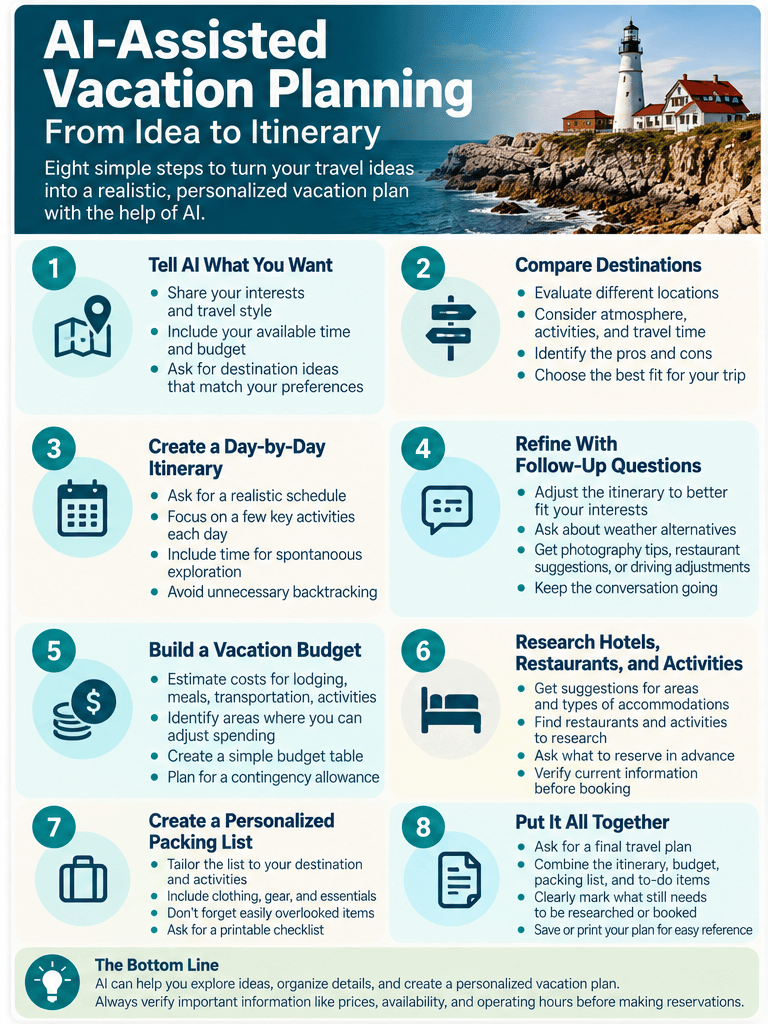
Step 1: Tell AI What Kind of Vacation You Want
A common mistake is starting with a question that’s too broad.
For example:
“Where should I go on vacation?”
You might receive a list of popular destinations, but those suggestions won’t necessarily reflect your interests.
A better approach is to explain what you enjoy, how much time you have, and what kind of experience you’re looking for.
Try this prompt
“I’m planning a five-day vacation in September. I enjoy scenic coastal destinations, photography, seafood restaurants, and easy nature walks. I prefer smaller towns over large cities and don’t want an overly busy schedule. Suggest five destinations in the northeastern United States that would be a good fit. Explain the advantages and disadvantages of each.”
What this accomplishes
You’ve given the AI useful information about:
- Your available time
- Your interests
- Your preferred atmosphere
- Your travel region
- The type of comparison you want
Instead of a generic list, you’re more likely to receive recommendations tailored to your preferences.
For our example, let’s assume we decide to explore coastal Maine.
Beginner tip: If you already know where you want to go, skip the destination comparison and start with Step 2.
Step 2: Narrow Down the Best Places to Visit
Coastal Maine stretches for hundreds of miles and includes everything from lively waterfront towns to quiet fishing villages.
Trying to see everything in five days would make for a rushed vacation.
Instead, ask AI to help narrow the options.
Try this prompt
“I’ve decided on a five-day trip to coastal Maine in September. I enjoy landscape photography, local seafood, scenic drives, lighthouses, and short nature walks. Compare Portland, Camden, Boothbay Harbor, and Bar Harbor as possible places to stay. Consider atmosphere, nearby activities, driving distances, and how crowded they might be. Present the comparison in a simple table.”
What this accomplishes
The AI can organize the destinations into a format that’s easier to compare.
For example, you might see a table like this:
| Destination | General atmosphere | Potential appeal |
|---|---|---|
| Portland | Small city with a lively dining scene | Restaurants, waterfront, nearby lighthouses |
| Camden | Scenic harbor town | Photography, harbor views, nearby hills |
| Boothbay Harbor | Coastal resort and fishing community | Boat excursions, waterfront scenery |
| Bar Harbor | Gateway to Acadia National Park | Hiking, landscapes, wildlife viewing |
This is an illustrative comparison, not a current assessment of crowds, prices, or availability.
Take it one step further
Ask:
“Based on my interests and limited time, which two destinations would make the most practical bases for this trip? Explain your reasoning.”
The goal isn’t necessarily to accept the first recommendation.
It’s to explore the trade-offs and decide what works best for you.
Step 3: Create a Realistic Day-by-Day Itinerary
Now comes one of the most enjoyable parts: turning your ideas into an actual vacation plan.
For this example, let’s focus on Portland and Camden, with opportunities to explore the surrounding coastline.
Try this prompt
“Create a relaxed five-day coastal Maine itinerary in September, using Portland and Camden as two bases. I enjoy photography, scenic drives, seafood restaurants, lighthouses, and easy nature walks. Limit the schedule to two main activities per day, allow time for spontaneous stops, and avoid unnecessary backtracking. Include suggested areas to explore rather than assuming specific businesses are open.”
Example of what AI might suggest
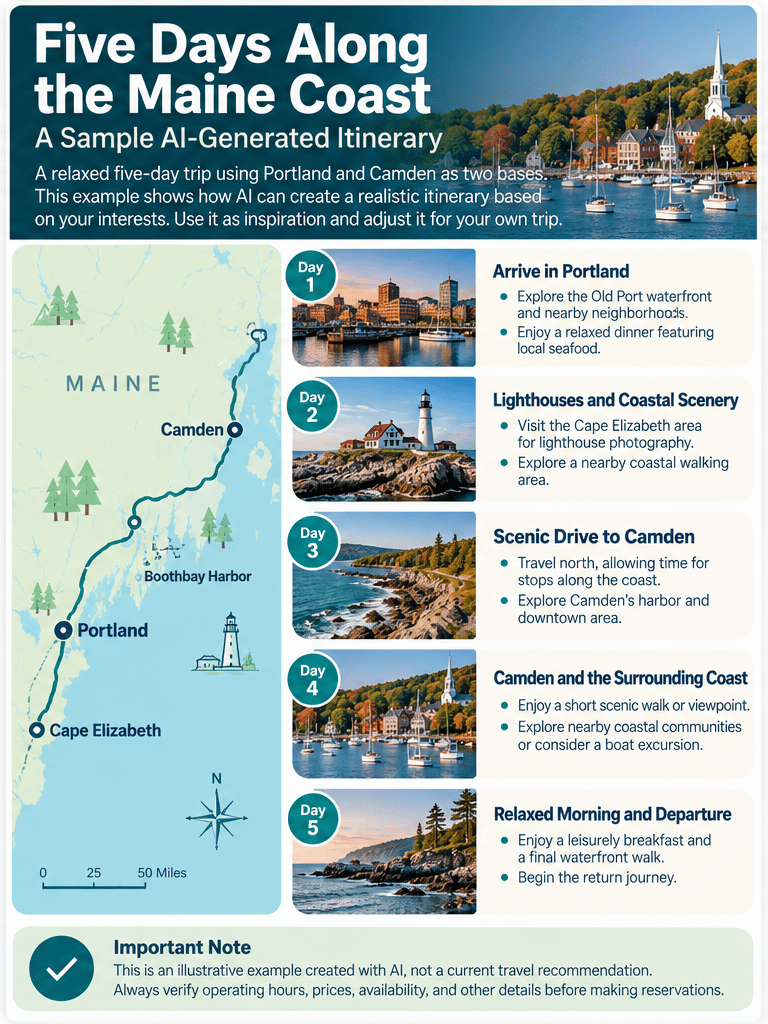
Day 1: Arrive in Portland
- Explore the Old Port waterfront.
- Enjoy a relaxed dinner featuring local seafood.
Day 2: Lighthouses and Coastal Scenery
- Visit the Cape Elizabeth area for lighthouse photography.
- Explore a nearby coastal walking area.
Day 3: Scenic Drive to Camden
- Travel north, allowing time for stops along the coast.
- Explore Camden’s harbor and downtown area.
Day 4: Camden and the Surrounding Coast
- Enjoy a short scenic walk or viewpoint.
- Explore nearby coastal communities or consider a boat excursion.
Day 5: Relaxed Morning and Departure
- Enjoy breakfast and a final waterfront walk.
- Begin the return journey.
This is a sample itinerary to demonstrate the process, not a verified travel plan.
Actual driving times, attraction access, and operating schedules should be checked before traveling.
Why this works
Notice that we asked AI to limit the number of activities.
Without that instruction, it might create an exhausting schedule filled with attractions and long drives.
By explaining our preferred pace, we can encourage a more realistic itinerary.
Step 4: Improve the Itinerary With Follow-Up Questions
Here’s where conversational AI becomes especially useful.
Your first itinerary doesn’t need to be perfect.
Maybe you’d like more photography opportunities.
Perhaps you’d prefer fewer restaurant suggestions and more outdoor activities.
Or maybe you discover that one day involves too much driving.
You can simply ask AI to revise the plan.
Try these follow-up prompts
“Which locations on this itinerary would offer the best opportunities for sunrise or sunset photography?”
“Can you revise Day 3 to include fewer stops and more time exploring Camden?”
“Suggest three rainy-day alternatives that would fit naturally into this itinerary.”
“Identify any days that might involve unnecessary driving and suggest a more efficient order.”
“Which activities should I reserve in advance, and which can I decide on spontaneously?”
Why follow-up questions matter
You don’t have to rewrite the entire vacation plan every time you change your mind.
AI can generally use the earlier conversation to refine its suggestions.
This is one of the most useful lessons for beginners: Treat AI planning as a conversation, not a one-time request.
Step 5: Build a Vacation Budget
Travel expenses can add up quickly.
AI can help you organize your expected costs before you begin making reservations.
Try this prompt
“Help me create a budget for a five-day coastal Maine vacation for two adults. Include lodging, meals, transportation, parking, activities, and a contingency allowance. Create a simple table with estimated costs, but clearly label all amounts as planning assumptions rather than current prices.”
Example planning budget
Here’s a fictional budget to illustrate how AI might organize the information.
| Expense | Planning estimate |
|---|---|
| Lodging — 4 nights at $200 | $800 |
| Meals — 5 days at $100 | $500 |
| Transportation and fuel | $200 |
| Parking and local transportation | $75 |
| Activities and admissions | $150 |
| Contingency allowance | $200 |
| Estimated total | $1,925 |
These figures are examples only. They are not live travel quotes and may not reflect actual costs for your dates or circumstances.
Make it more useful
You can ask:
“Which expenses are most likely to vary, and how could I reduce the budget by 15% without eliminating the main activities?”
Or:
“Create a budget checklist showing which expenses I should confirm before booking.”
AI can help you think through the financial side of a trip, but current prices should always come from actual providers.
Step 6: Research Hotels, Restaurants, and Activities
This is the stage where AI suggestions need more careful verification.
An assistant might recommend a hotel that has changed ownership, a restaurant that’s closed, or an attraction with different operating hours.
That doesn’t make AI useless.
It simply means we should use it to develop a shortlist rather than treat every recommendation as confirmed.
Try this prompt
“Suggest the types of accommodations and neighborhoods I should consider in Portland and Camden, Maine, for a relaxed coastal vacation. Explain the advantages and disadvantages of staying near the waterfront versus farther from the town center. Don’t invent current room rates or availability.”
For restaurants
“Help me identify what to look for when choosing seafood restaurants in Portland and Camden. I prefer locally focused menus and casual but high-quality dining. Suggest a shortlist of places to research, and clearly distinguish recommendations from verified current information.”
For activities
“Create a checklist of the information I should verify before visiting lighthouses, coastal parks, and boat tour operators during a September trip to Maine.”
The important verification step
Once you have a shortlist, visit official websites or trusted booking services to confirm:
- Current operating hours
- Prices and fees
- Availability
- Reservation requirements
- Cancellation policies
- Accessibility and other important restrictions
If your AI assistant can search the web, you can ask it to find current sources. Still, open those sources yourself before making important decisions.
Step 7: Create a Personalized Packing List
Packing lists are another area where AI can save time.
Instead of searching for a generic checklist, you can ask for one tailored to your destination, activities, and travel dates.
Try this prompt
“Create a packing checklist for a five-day September vacation along the Maine coast. We’ll be doing casual sightseeing, photography, short nature walks, and dining out. Include clothing layers, rain protection, camera equipment, travel essentials, and items that are easy to forget. Organize the list into categories.”
Make it even better
Ask:
“Turn this into a printable checklist with separate sections for clothing, electronics, toiletries, and travel documents.”
Or:
“Which items should I pack in a carry-on bag if I’m flying?”
Remember that weather conditions can change. Check an up-to-date forecast shortly before departure.
Step 8: Put Everything Into One Final Travel Plan
By now, your AI conversation may contain destination comparisons, itinerary revisions, budget estimates, packing suggestions, and other useful information.
Instead of scrolling through the entire conversation, ask AI to consolidate everything.
Try this prompt
“Using the travel plans we’ve developed in this conversation, create a final five-day vacation planning document. Include a daily itinerary, lodging areas, estimated budget, packing checklist, and a separate section listing everything I still need to verify or book. Clearly mark any information that hasn’t been confirmed.”
What you should receive
A well-organized travel plan that you can review, edit, and potentially save or print.
Depending on the AI service and features available, you may be able to export the result as a document or copy it into your preferred notes application.
Beginner tip: Ask AI to put all unverified details into one checklist. That makes it much easier to distinguish planning ideas from confirmed reservations.
A Few Things AI Shouldn’t Decide for You
AI can help organize your vacation, but some decisions still require your judgment.
For example:
Your actual budget: AI can suggest ways to allocate spending, but only you know what you’re comfortable spending.
Safety and accessibility: Confirm important travel conditions through official sources, particularly when health, mobility, or safety is involved.
Reservations and payments: Review details carefully before booking, including dates, prices, cancellation terms, and the legitimacy of the provider.
Your personal preferences: AI may suggest popular attractions, but that doesn’t mean they’ll be enjoyable for you.
And remember to protect your privacy. Avoid unnecessarily sharing passport numbers, payment information, account credentials, or sensitive travel documents in AI conversations.
Your Turn: Plan a Weekend Getaway in 10 Minutes
You don’t need a five-day vacation to practice these skills.
Try this shorter exercise.
Step 1: Choose a destination or region.
It could be somewhere you’ve always wanted to visit or a place within a few hours of home.
Step 2: Tell AI what you enjoy.
Include your interests, budget, available time, and preferred pace.
Step 3: Ask for a simple two-day itinerary.
Limit the schedule to two or three main activities each day.
Step 4: Refine the plan.
Ask one follow-up question about restaurants, scenic stops, weather alternatives, or reducing travel time.
Step 5: Request a final checklist.
Ask AI to identify what needs to be researched, confirmed, or reserved.
In about ten minutes, you’ll have practiced an entire AI-assisted planning workflow.
And you’ll have a starting point for a real trip.
The Bottom Line: Let AI Handle the Organizing, Not the Deciding
AI can make travel planning more enjoyable by helping you discover ideas, compare options, and organize details.
But its greatest value isn’t necessarily finding the perfect destination.
It’s helping you think through the possibilities and build a trip around what matters to you.
Start with a clear goal. Explain your preferences. Refine the suggestions. Verify the important details.
Then make the final decisions yourself.
You may find that planning your next vacation becomes almost as enjoyable as taking it.
Technology changes. Curiosity doesn’t.
Keep Learning With Promptly Practical
This tutorial brings together several skills we’ve covered in our beginner series.
- Your First 15 Minutes With ChatGPT: A Beginner’s Step-by-Step Guide — Learn how to start a conversation with AI.
- What Is ChatGPT? A Simple Explanation for Beginners — Understand what AI assistants can do.
- 10 Surprisingly Useful Ways AI Can Make Everyday Life Easier — Explore other practical applications.
- AI Privacy and Safety: What Every Beginner Should Know — Protect your information and verify important answers.
- How to Write Better AI Prompts: A Beginner’s Guide to Getting Better Answers — Learn to ask clearer, more useful questions.
Ready for your next project? Choose something you’ve been meaning to plan and see how AI can help you get started.


Leave a Reply